
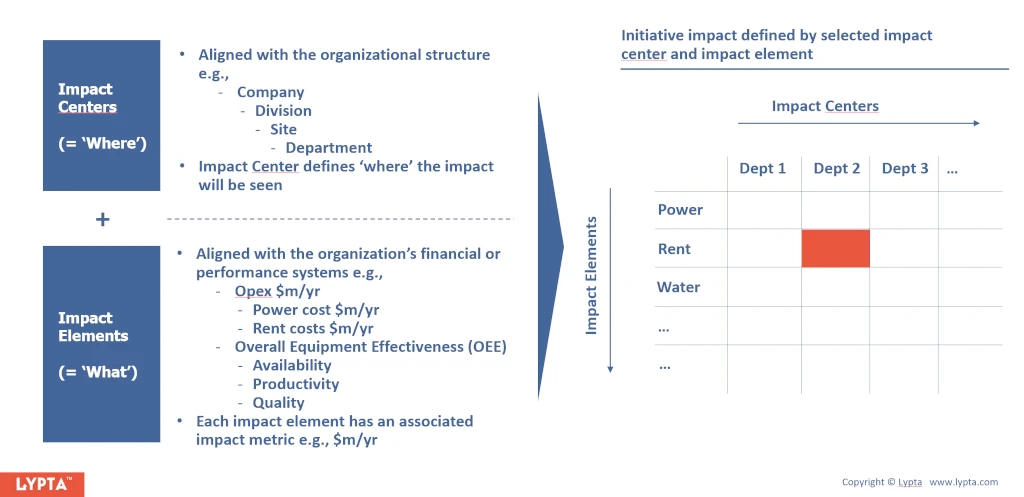
Impacts can be measured in any unit needed including financial measures (e.g., opex, capex, revenue) and also physical measures (e.g., rate, availability, and utilisation). Each impact element is associated with an impact ‘metric’ (e.g., $, %, m) which is created during set-up.
Financial impact elements are expected to align with the organisation’s financial accounting structure. Additionally, each impact element has a descriptor field which can be used to map back to the finance line code if being used as a financial impact element. Aligning financial impact elements with the organisation’s financial accounting enables Finance to understand which line items are expected to be impacted and by how much at the start of each initiative for budgeting purposes and also enables Finance to measure results impact at the end of each initiative.
Adding or editing/deleting impact elements requires SuperAdmin authority level as is typically done at initial set-up. To add an impact element:
- Select ‘Admin/Change Structure’ section
- Select ‘Impact Elements’ menu option
- Select ‘Create impact element’ button
- Complete ‘Impact Element’ form
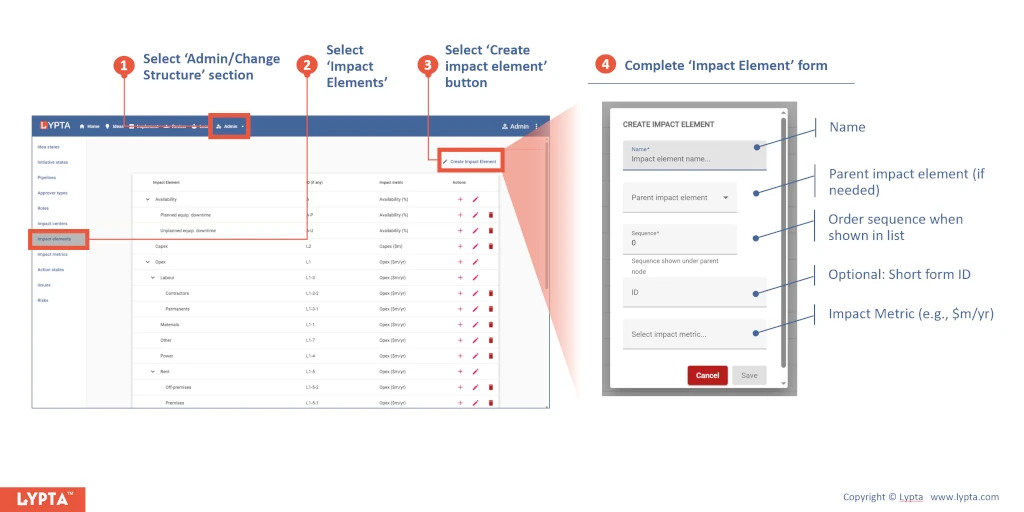
Once the impact element has been created, you can then edit or delete the impact element as needed by selecting the appropriate ‘edit’ or ‘delete’ icons on the right hand side of the impact elements list.
