
Each impact element must have an impact metric (which can be common across multiple impact elements) e.g., labour and power impact elements might both have a shared impact metric of ‘opex $m/yr’; similarly unplanned and planned downtime might have a shared impact metric of availability %.
To add an impact metric:
- Select ‘Admin/Change Structure’ section
- Select ‘Impact Metrics’ menu item
- Select ‘Create impact metric’ button
- Complete ‘Impact Metric’ form
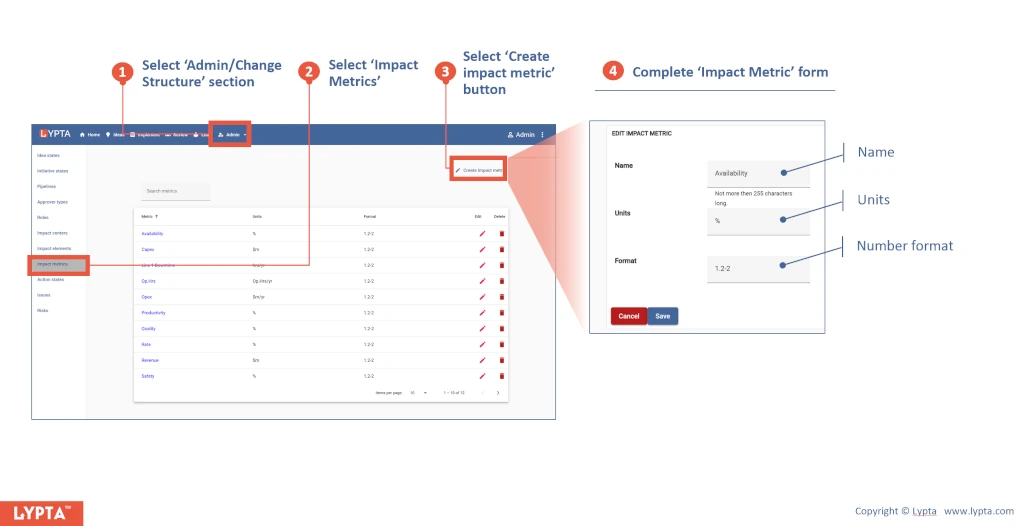
The number format for the impact metric defines how that format is displayed in any output showing that impact.
The number format is defined as {minIntegerDigits}.{minFractionDigits}-{maxFractionDigits}:
- minIntegerDigits: Minimum number of digits before the decimal point (pads with zeros if needed). Default is 1.
- minFractionDigits: Minimum number of digits after the decimal point (pads with zeros if needed). Default is 0.
- maxFractionDigits: Maximum number of digits after the decimal point (trims if needed). Default is 3.
As examples:
- 123.4 with format ‘1.2-2’ is output as 123.40
- 5 with format ‘2.0-0’ is output as 05
