
Initiative summary page
The initiative summary page is the first page seen when opening an initiative and includes:
-
Overall Summary: Key initiative data used to set-up the initiative initially:
-
Title: Initiative title with enough description to understand the main purpose of the initiative when reading the title from the initiative list page
-
Description (optional): Short description of the initiative
-
Improvement pipeline: Pipeline for the initiative defining which stage gates will be followed when implementing the initiatives
-
Team: The team that owns the initiative from an implementation perspective. Note: impacts can be defined for any area of the organization (and can be different from the team defined here)
-
Initiative owner: The person who will own/update the initiative (single point of accountability). Note: additional users can be added as editors for the initiative if needed (in initiative settings)
-
Business owner (optional): The line leader for the business area being impacted by the initiative.
-
Initiative tags: Short one word tags that can be used to categorise the initiative and can be used in search criteria
-
Created: Date initiative created
-
-
Impact summary: List of the expected initiative impacts e.g., opex
-
Current initiative status:
-
Stage: Current stage e.g., ‘Planning’
-
Active: Current initiative state e.g., ‘Active’, ‘On hold’
-
Health: If on track or not on track
-
Escalated: Y/N (and escalation if has been escalated)
-
-
Optional additional summary fields: Extra fields as needed to fully describe the initiative may also be shown on the summary page depending on how Lypta has been configured for your organization by your Super Admin during deployment. Extra fields might include ‘Situation’, ‘Complication/opportunity’, ‘Solution’, ‘Scope’.
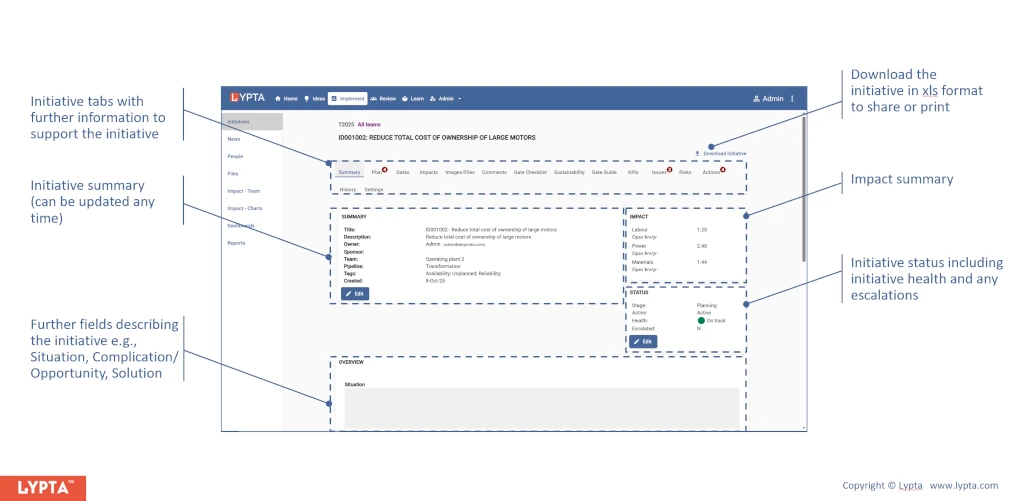
Available initiative components
Additional to the summary page, each initiative also has additional tabs/pages to support the initiative throughout its life-cycle moving from an initial idea/concept through to being locked-in with a sustained performance uplift. These components have different importance/usage during the life-cycle:
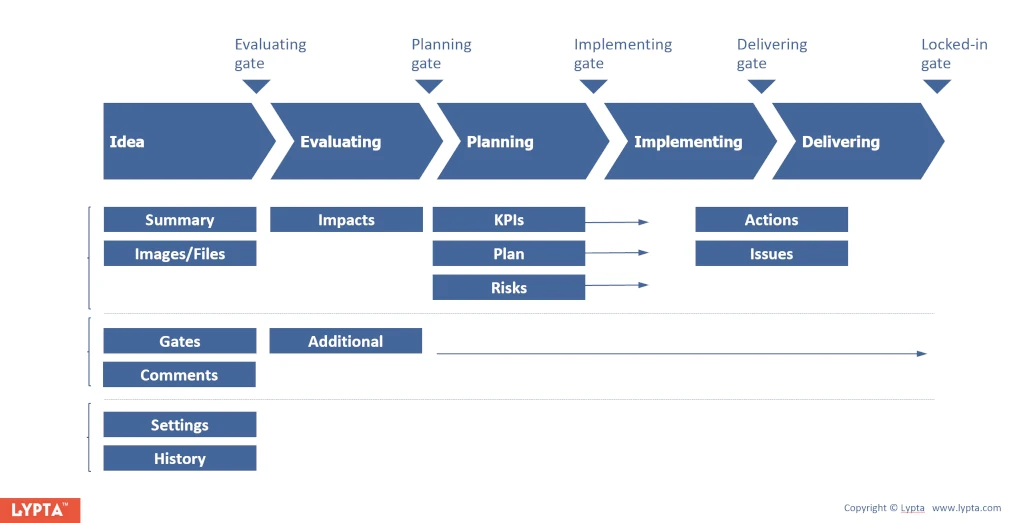
Core initiative components
Initiative owners have the option to hide/show components at any time but core components are expected to include:
- Summary: A high level summary of the initiative
- Actions: All short term actions associated with the initiative. Actions track short duration ‘tactical’ activities (usually 1-7 days maximum) that come up each week
- Implementation plan: Planned work steps required to implement the initiative. These work steps are major planned activities (usually requiring at least one week of work) and can be defined during implementation planning prior to implementation
- Gates: Stage gates showing current gate status for each gate (passed/not passed)
- Impacts: Expected impact values delivered by the initiative (Plan, Forecast, Actual)
- Images/files: Uploaded documents and images associated with the initiative
- KPIs: KPIs tracking initiative performance. These KPIs can also include potential adverse/risk KPIs if needed in addition to expected benefit KPIs
- Settings: Allows the initiative owner to both add additional initiative editors and gate approvers. Additionally, allows the initiative owner to show/hide optional initiative pages
Optional initiative components
Additional components are also available depending on the needs of the improvement program and include:
- Comments: Feedback on the initiative. The initiative owner can choose to open or close off the initiative to comment if wanted
- Issues: Issues associated with initiative implementation
- Risks: Potential risks and mitigations
- History: History of all major initiative changes with dates e.g., stage gate changes, initiative health state changes
- Additional dynamic pages: Dynamic pages can be added by Super Admin to an initiative as additional template pages and include both dynamic fields and static content. Potentially useful additional pages include gate checklists, gate guide, sustainability guide, zero harm guide
