Initiatives can be created in one of two ways:
- Generating an initiative from an existing idea (in which case the title and description will be pre-defined)
- Creating an initiative from scratch (in the ‘Implement’ section)
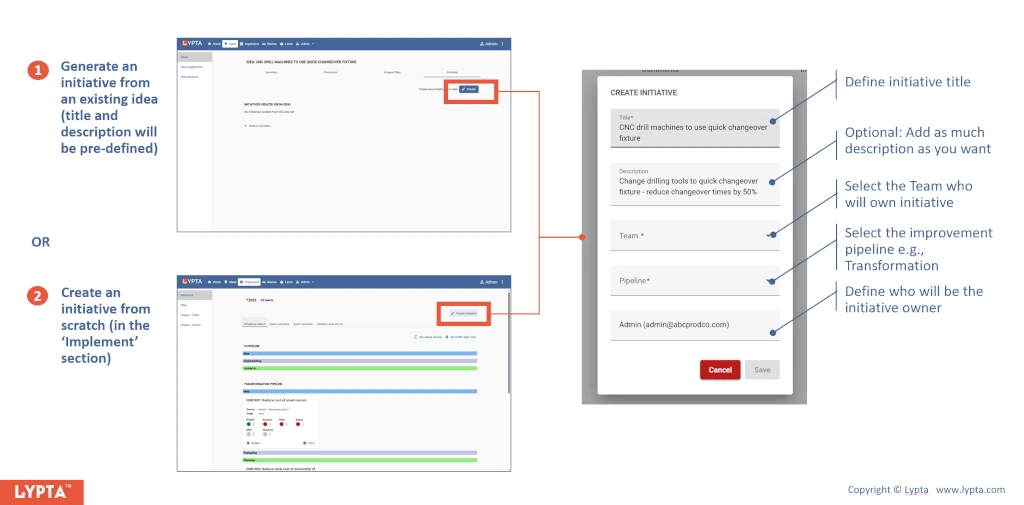
The ‘Create initiative’ form includes the following information:
- Title: Initiative title with enough description to understand the main purpose of the initiative when reading the title from the initiative list page
- Description (optional): Short description of the initiative
- Team: The team that owns the initiative from an implementation perspective. Note: impacts can be defined for any area of the organization (and can be different from the change org defined here)
- Improvement pipeline: Workflow for the initiative defining which stage gates will be followed when implementing the initiatives
- Initiative owner: The person who will own/update the initiative (single point of accountability). Note: additional users can be added as editors for the initiative if needed (in initiative settings)
Gate approvers for the initiative are automatically defined dependent on the workflow and team defined for the initiative.
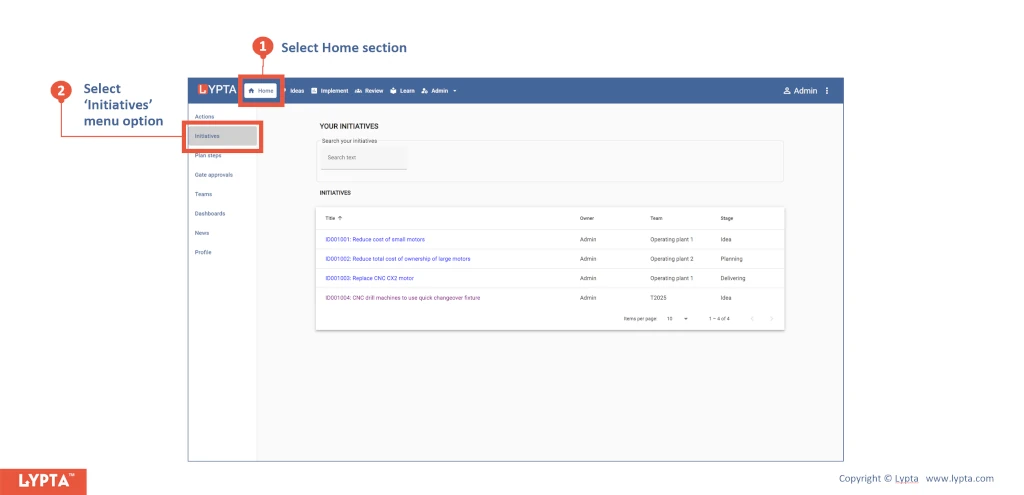
Once the initiative owner has been created, the initiative owner will see the initiative listed by:
- Selecting ‘Home’ section
- Selecting the ‘Initiatives’ menu option.