Initiative pages (listing initiatives)
Initiatives can be found in three different locations (in additional to the ‘Home’ section if the user is the initiative owner:
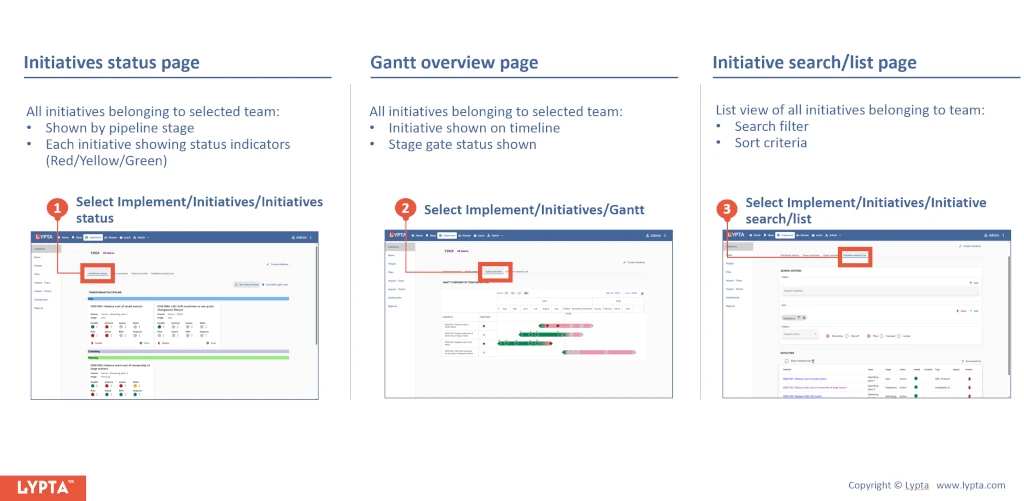
Initiative search/list page
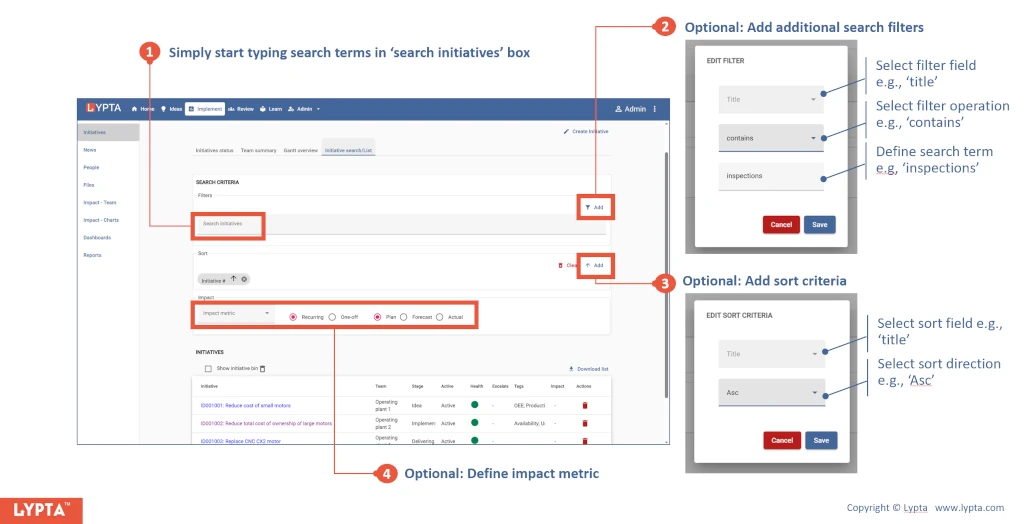
Initiatives can be explicitly searched and listed using the initiative search/list page:
- Select the initiative search/list page (in ‘Implement’ section) and simply start typing search terms in the ‘search initiatives’ box
- Optional: Add additional search filters. Select ‘Add filter’ and then select the required filter field from the first drop down list (e.g., title) and then the required filter operator from the second drop down list (e.g., ‘Equals’, ‘Contains’,…)
- Optional: Add sort criteria. Select ‘Add sort’ and then select the sort field from the first drop down list (e.g., title) and then the sort operator from the second drop down (e.g., ‘ASC’ or ‘DESC’)
- Optional: Add impact criteria/metrics (to show in the listing). The value of each initiative in the list can be shown by selecting the impact from the impact drop down list in the search criteria fields. Impact value can also be selected on the basis of recurring vs one-off impact and by plan, forecast, actual impact values.