
Initiative owners can use the initiative ‘Settings’ page to:
- Give other users full initiative edit access and make individuals gate approvers for the initiative
- Show/hide pages from view
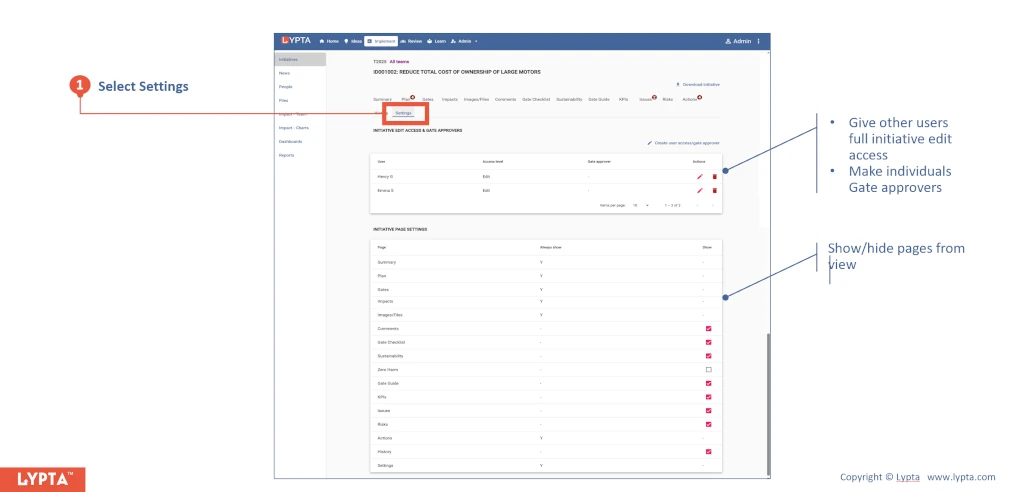
1. Initiative edit access and approval rights
- Add initiative editors so that other users have edit rights for the initiative. This can be useful when the initiative owner is on leave and avoids the initiative owner becoming a ‘single point of dependency’ at critical time
- Add initiative gate approvers if needed. Whilst gate approvers are usually defined by change org leads and admin, some initiatives require additional gate approvers. This might be needed when an initiative has an impact outside the change org (e.g., Procurement) and the business being impacted might want to ensure they also have gate approver rights
2. Show/hide pages from view
Additionally, initiative owners can also choose to show/hide selected pages for the initiative. Initiatives are initially created with a default format defined by Super Admin and typically some pages are defined as ‘always shown’ whilst for other other pages the initiative owner can choose to hide if they with to simplify the initiative menu layout at the top of the page.
Typical must have pages are:
- Summary: A high level summary of the initiative
- Actions: All short term actions associated with the initiative. Actions track short duration ‘tactical’ activities (usually 1-7 days maximum) that come up each week
- Implementation plan: Planned work steps required to implement the initiative. These work steps are major planned activities (usually requiring at least one week of work) and can be defined during implementation planning prior to implementation
- Gates: Stage gates showing current gate status for each gate (passed/not passed)
- Impacts: Expected impact values delivered by the initiative (Plan, Forecast, Actual)
- Images/files: Uploaded documents and images associated with the initiative
- KPIs: KPIs tracking initiative performance. These KPIs can also include potential adverse/risk KPIs if needed in addition to expected benefit KPIs
- Settings: Allows the initiative owner to both add additional initiative editors and gate approvers. Additionally, allows the initiative owner to show/hide optional initiative pages
Optional pages, potentially required for major transformations with increased stage gates and increased information requirements include:
- Comments: Feedback on the initiative. The initiative owner can choose to open or close off the initiative to comment if wanted
- Issues: Issues associated with initiative implementation
- Risks: Potential risks and mitigations
- History: History of all major initiative changes with dates e.g., stage gate changes, initiative health state changes
