
SuperAdmin can define app colors used throughout the Lypta app (traffic lights, gantt, stage gates, KPIs and impact target colors).
To set the app colors:
- Select ‘Admin/General’ section from the ‘Admin’ dropdown list in the top navigation bar
- Select ‘App Settings’ menu option
- Select ‘Other settings’ tab
You will then see the full list of other settings used – these can be changed by selecting the ‘Edit’ button and then the relevant field for the required app setting.
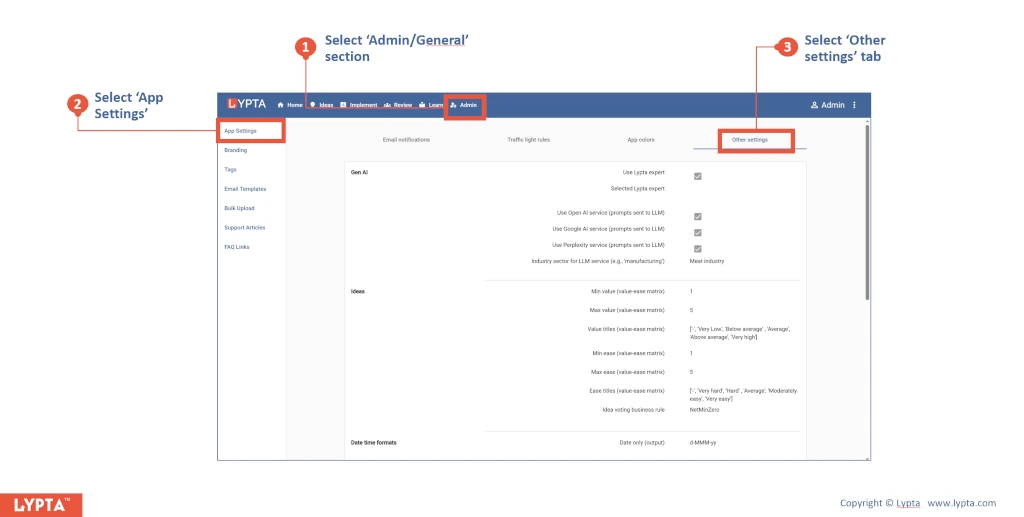
Define various other business rules and formats.
Gen AI (for suggested ideas):
- Use Lypta expert – Only available in Enterprise
- Selected Lypta expert – Only available in Enterprise
- Use Open AI service (prompts sent to LLM)
- Use Google AI service (prompts sent to LLM)
- Use Perplexity service (prompts sent to LLM)
- Industry sector for LLM service (e.g., ‘manufacturing’)
Ideas:
- Min value (value-ease matrix) = 1
- Max value (value-ease matrix) = 5
- Value titles (value-ease matrix) = [‘-‘, ‘Very Low’, ‘Below average’ , ‘Average’, ‘Above average’, ‘Very high’]
- Min ease (value-ease matrix) = 1
- Max ease (value-ease matrix) = 5
- Ease titles (value-ease matrix) [‘-‘, ‘Very hard’, ‘Hard’ , ‘Average’, ‘Moderately easy’, ‘Very easy’]
- Idea voting business rule – NetMinZero
Date time formats:
- Date only (output) = d-MMM-yy
- Date + Time (output) = d-MMM-yy HH:mm
- Day picker = DD-MMM-YY
- Month picker = MMM-YYYYY
Entity numbering formats:
- Action numbering = A{0}
- Issue numbering = I{0}
- Risk numbering = R{0}
- KPI numbering = KPI{0}
- Work plan step numbering = {0}
Gantt resource settings:
- Gantt resource name display = DisplayName
Org details:
- Org name = Client specific
- Org ID = Client specific
