
The team summary dashboard gives an instant view of overall status across all initiatives belonging to the team.
Dashboard cards are available to show team status for:
- Impact: Overall impact against team target
- Health: Health status across all initiatives as reported by initiative owners
- Actions: Actions status across all initiatives based on plan due date and if date has slipped or not and also action activity over recent timeline including how many actions opened and closed
- Issues: Issues status across all initiatives showing number of ‘major’ issues based on issue severity and also how many issues opened and closed over recent timeline
- Risks: Risks status across all initiatives showing number of risks by risk rating (e.g., critical, high, medium, low) and also how many risks opened and closed over recent timeline
- Plan: Work plan status across all initiatives based on number of plan steps that are late or slipped and also work step activity over recent timeline including how many work steps opened and closed
- Gates: Gates status across all initiatives based on plan due date
- KPIs: KPI status across all initiatives based on if meeting target, almost meeting target or significantly below target
Options exist to determine which of these cards are shown in the dashboard. To define the format:
- Select ‘Initiatives’ menu option for the team (in the ‘Implement’ section)
- Select ‘Team summary’ tab
- Select ‘Summary format’ button
- Complete ‘Set cards format’ form
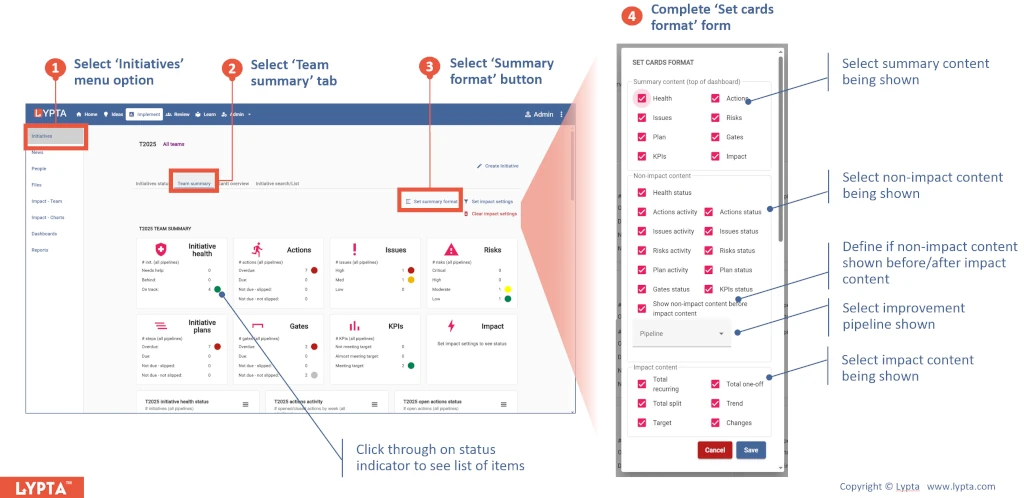
This dashboard also has ‘click-through’ on any of the cards including the summary card at the top of the dashboard. As an example, this allows a user to instantly see which initiatives are currently ‘green’ (on track), ‘yellow’ (needs help) or ‘red’ (behind plan) – enabling the user to track through to the root cause of any yellow or red indicators.
