
Adding a user to the Lypta system requires ‘SuperAdmin’ authority level. Steps to add a user:
- Select ‘Admin – Users’ section and then ‘Users’ menu option
- Select ‘Create user’ button
- Complete ‘Create user’ form
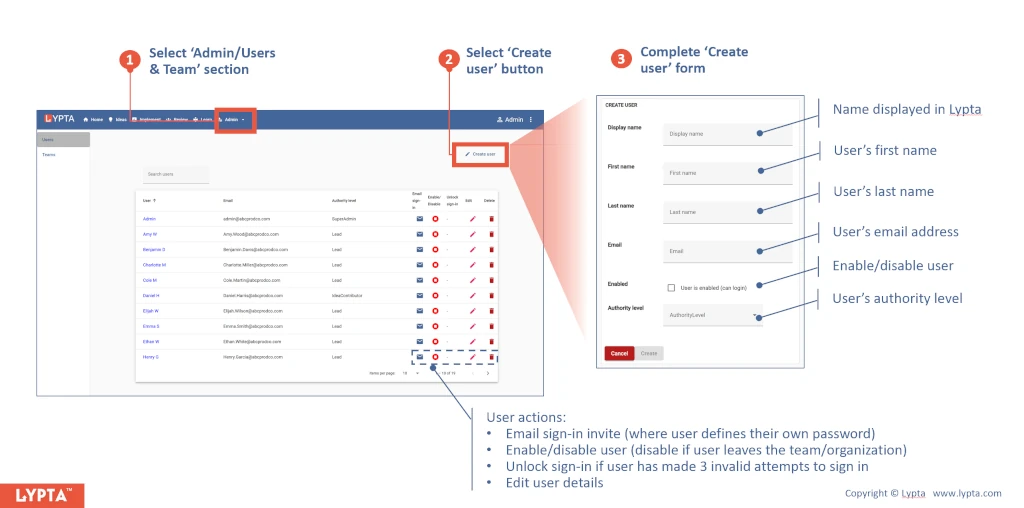
Once user is created, SuperAdmin is able, via the action icons shown for each user, to:
- Email sign-in invite (where user defines their own password) – this allows the user to log into Lypta for the first time and define their password.
- Enable/disable user (disable if user leaves the team/organization) – this gives SuperAdmin the ability to instantly disable an account if needed.
- Unlock sign-in if user has made 3 invalid attempts to sign in – at times users will forget their password… If they make 3 failed attempts at logging into Lypta, their account is automatically disabled for a fixed time period as a security precaution. If they need immediate log-in, SuperAdmin can unlock the account (enabling the user to try logging in again). Alternatively, the user can also reset their own password by selecting the ‘forgot password’ link on the login screen.
- Edit user details – this includes name details. The user can also can also edit their own name details at any time.
