
Ideas can be created quickly and easily. More content can added as needed at any time once the idea is created including further description and images/files by:
- Select ideas section
- Select ‘Create idea’ button
- Complete ‘Create idea’ form
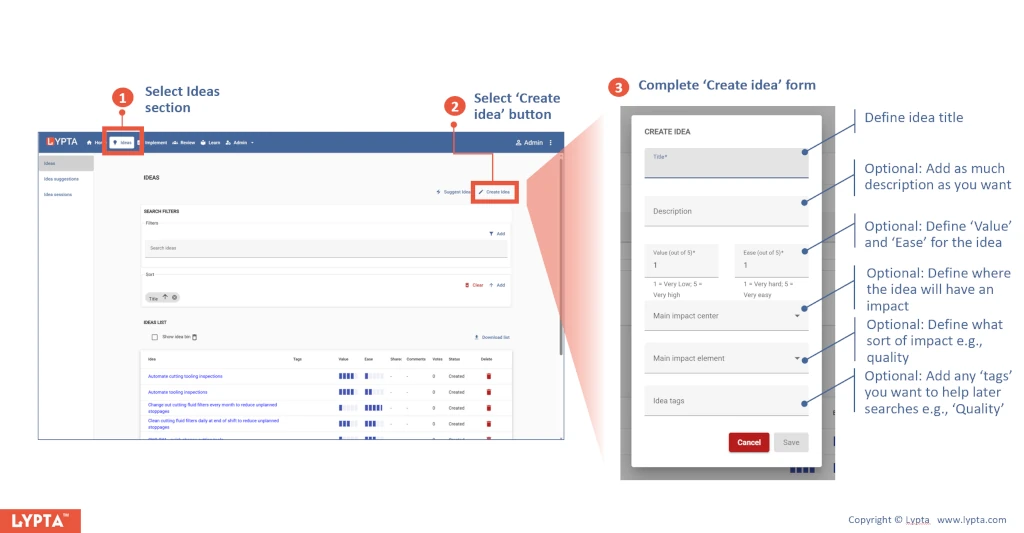
The initial data needed to create an idea includes:
- Title: one line description defining the idea
- Short description (optional): a description of the idea outlining the main points – enough for you to understand the key issue/opportunity
- Value (optional): nominal value of the idea which may be in terms of $ or more abstract such as safety or quality (usually on a scale of 1 to 5 where 1 is low and 5 is high)
- Ease (optional): nominal ease of implementing the idea (also usually on a scale of 1 to 5 where 1 is low ease and 5 is high ease ie very easy to implement)
Value-ease scores, whilst subjective, can then be used to prioritise your ideas by sorting your idea lists based on their values.
