
SuperAdmin can define if email notifications should be sent out by the system in response to system triggers.
To set the email notifications:
- Select ‘Admin/General’ section from the ‘Admin’ dropdown list in the top navigation bar
- Select ‘App Settings’ menu option
- Select ‘Email notifications’ tab
You will then see the full list of available email notifications – these can be switched on/off by selecting the ‘Edit’ button and then the relevant checkbox for the required notification.
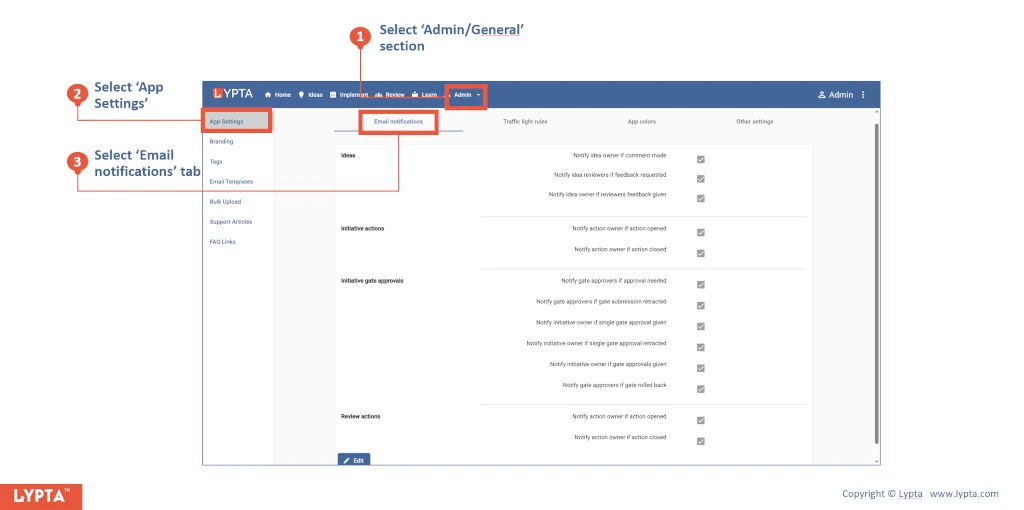
The following email notifications are available.
Ideas:
- Notify idea owner if comment made
- Notify idea reviewers if feedback requested
- Notify idea owner if reviewers feedback given
Initiative actions:
- Notify action owner if action opened
- Notify action owner if action closed
Initiative gate approvals:
- Notify gate approvers if approval needed
- Notify gate approvers if gate submission retracted
- Notify initiative owner if single gate approval given
- Notify initiative owner if single gate approval retracted
- Notify initiative owner if gate approvals given
- Notify gate approvers if gate rolled back
Review actions:
- Notify action owner if action opened
- Notify action owner if action closed
