
Initiative stakeholders can keep track of short term actions needed to implement the initiative. These are intended to be the day-to-day ‘tactical’ actions with typical 1-7 days duration and usually generated in weekly progress reviews or initiative updates.
Due date and status of these actions are tracked. Due date can be changed but the original due date is still retained and shown alongside the new due date.
Initiative owners (and users with initiative edit rights) can create new actions as needed by:
- Selecting initiative ‘Actions’ tab
- Selecting ‘Create action’ button
- Completing ‘Create Action’ form
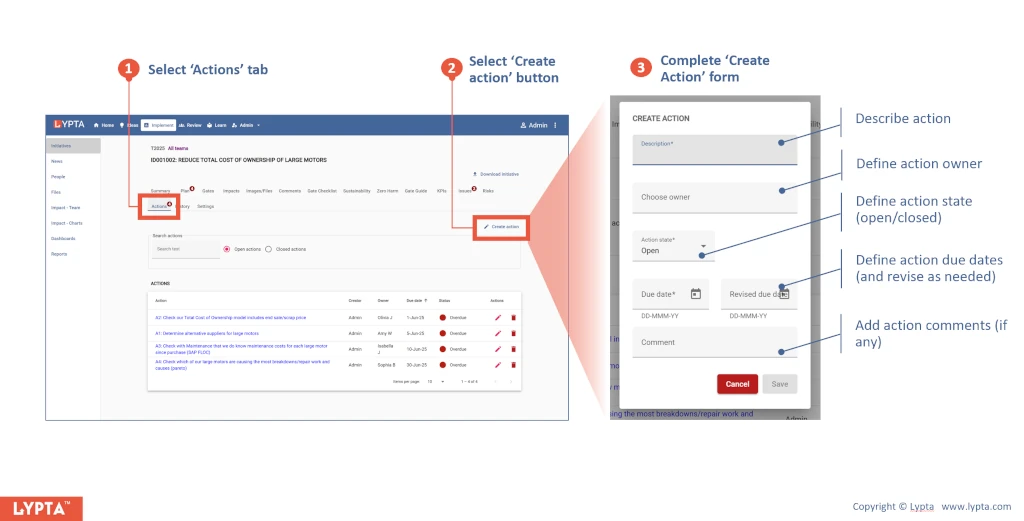
Once the action has been created, it can be easily edited or deleted by selecting the respective edit or delete icons (on the right hand side of each action).
Actions can also be easily found in your ‘Home’ section – both the actions that you have created and also the actions that you own (are expected to complete).
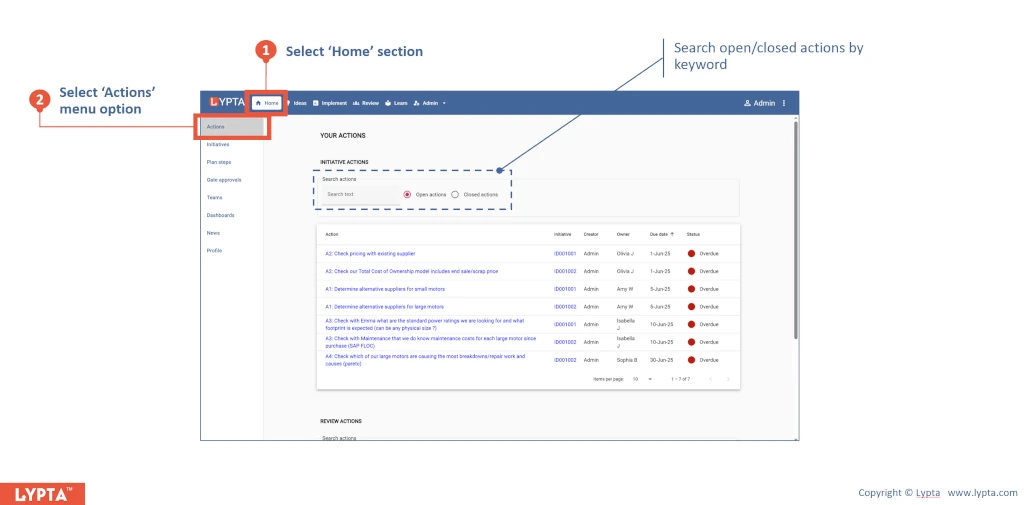
By default only currently open actions are shown. Previously closed actions can be shown if needed by selecting ‘Closed’ actions.
